
Find the right customer tenant
Use this runbook before any tenant-specific support action.
Before you begin
Section titled “Before you begin”You need one or more of:
- Customer company name.
- Customer email domain.
- Jericho organization name.
- Support ticket link.
- Authorized requester name.
- Open ActiveAdmin.
- Go to Organizations.
- Search for the customer name.
- Open the most likely organization.
- Check the organization name and customer domain.
- If the customer has parent/child tenants, read Organization scoping before continuing.
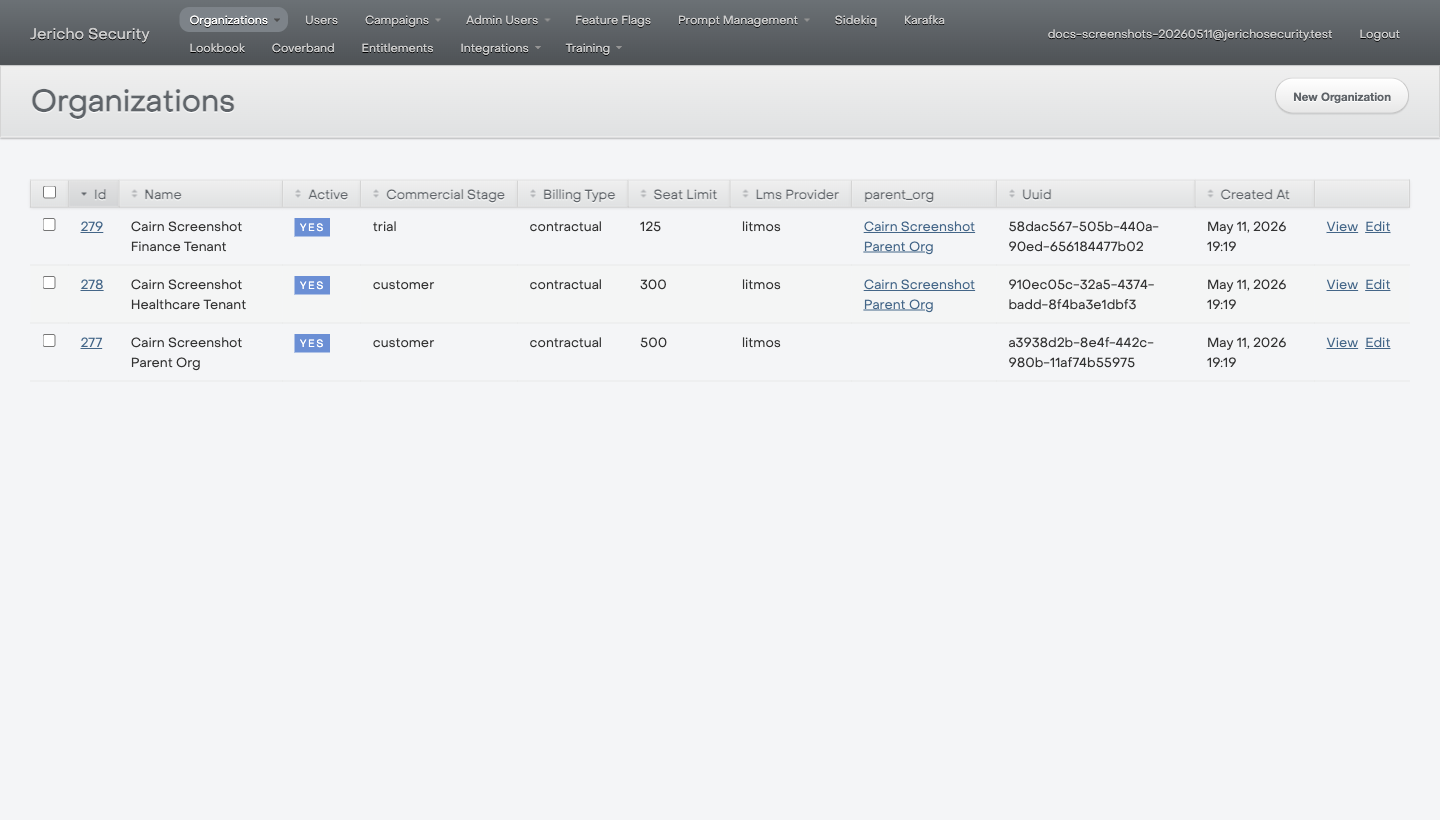
Use the Name, Active, Commercial Stage, Seat Limit, LMS Provider, and parent_org columns to avoid guessing between similar tenants.
Expected result
Section titled “Expected result”You have exactly one organization that matches the customer request.
If multiple tenants match
Section titled “If multiple tenants match”Do not guess.
- Compare the requester domain to the organization domain.
- Check whether one organization is a parent tenant and the other is a child tenant.
- Add a note to the ticket with the candidate organizations.
- Escalate if the correct tenant is still unclear.
Escalate when
Section titled “Escalate when”- You cannot identify the tenant confidently.
- The requester is not clearly associated with the tenant.
- The request involves moving users, campaigns, or configuration between tenants.