
Organization scoping
Organization scoping mistakes are high-risk. A correct support action in the wrong tenant is still a bad support action.
Mental model
Section titled “Mental model”Jericho may have:
- A customer organization.
- A parent organization for an partner or delegated operator.
- Child organizations for individual managed customers.
- Admin users scoped to one or more organizations.
Before changing organization-level settings
Section titled “Before changing organization-level settings”- Confirm whether the request is for the parent organization or a child customer organization.
- Confirm whether the setting is inherited or tenant-specific.
- Confirm whether the requester is allowed to manage that tenant.
- If any answer is unclear, escalate.
Common failure mode
Section titled “Common failure mode”The operator finds the parent organization, then changes a setting that should have been changed on a child organization.
Avoid this by checking the customer name, domain, and relationship before making changes.
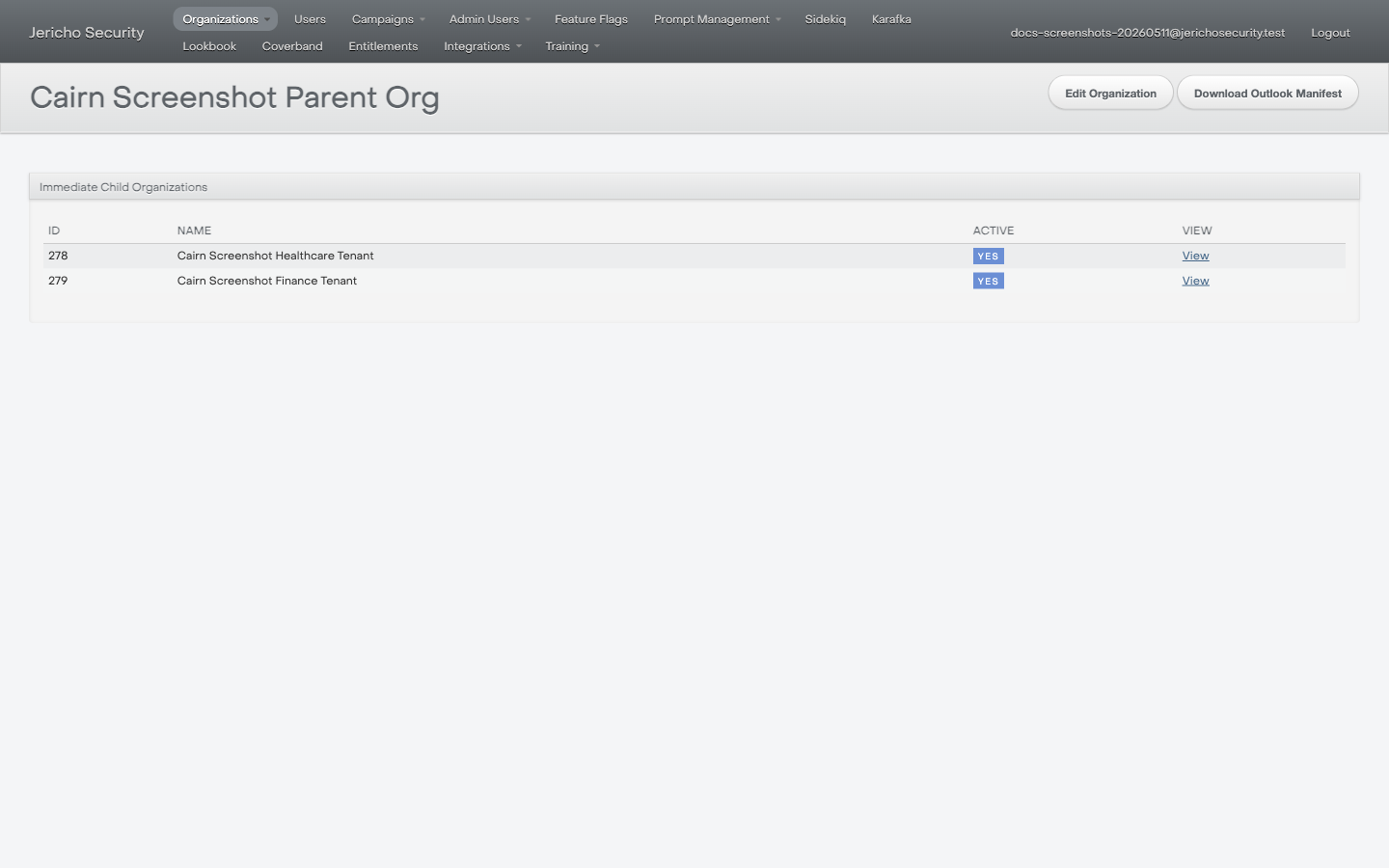
When a parent tenant has child organizations, pause before changing settings. The request may belong to a child tenant, not the parent.
Safe note format
Section titled “Safe note format”When escalating, include:
- Requested customer.
- Organization page URL.
- Parent organization, if any.
- Child organization, if any.
- Setting or workflow being investigated.
- Screenshot with sensitive fields redacted.